
ProShot
Rise Up GamesPhotography
4.4995.00 Reviews
- Version
- 8.34
- Installs
- 500.00K
- Age Rating
- Everyone
Screenshots
Our Review of ProShot
 Analysis by Appyee
I tend to reach for a dedicated camera app when I want more say over a photograph than the default camera gives me, especially when the light is tricky or I have a specific look in mind. ProShot, made by Rise Up Games, is a paid photography app for Android that puts manual controls alongside automatic shooting. Its appeal is less about replacing a full editing workflow and more about giving me useful decisions to make before I press the shutter.
That distinction matters if you are choosing a tool for creative work. A camera app can help you shape the original capture, but it is not automatically a complete route from idea to finished post. I see this as a practical option for taking more deliberate photos and video on a phone, with a learning curve that rewards curiosity rather than requiring technical knowledge on day one.
Starting with a shot, not a preset
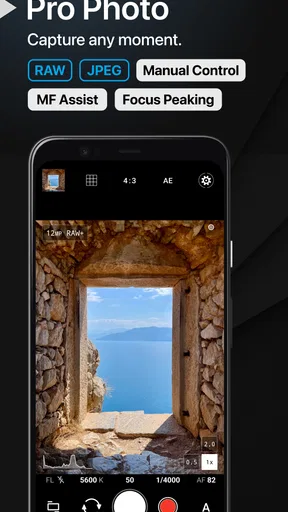
For a quick everyday picture, I would begin in automatic mode and let the app handle the basics. When I have time to shape the result, manual controls give me a way to make choices such as ISO and shutter speed rather than relying entirely on the phone. That is most useful when a scene is not changing quickly: a still-life setup at home, a building in steady daylight, or a friend posing while I try a few different exposures.
A useful habit is to change one setting at a time. If a photo looks too bright or too dark, altering several controls at once makes it harder to understand what improved it. I would first settle the exposure for the scene, then adjust another setting only if the result needs it. This turns manual shooting into a repeatable process instead of a guessing game.
The automatic option still has a place. If a child, pet, or passing moment is likely to disappear before I finish adjusting controls, speed matters more than fine control. I would use automatic shooting for those situations and save manual adjustments for scenes where I can pause. Having both approaches available is a better fit for mixed everyday use than insisting that every picture must be taken manually.
Making the capture work for the final image
Real-time filters can help me judge a look while framing, rather than leaving every creative decision until later. I would treat them as a preview of the direction I want, not a reason to apply an effect to every image. A restrained choice can make a set of photos feel consistent; switching styles from shot to shot can make a small collection feel less cohesive.
For anyone who edits afterward, RAW support changes the trade-off. A RAW file preserves more image information for later adjustments, which can be useful when I want room to refine a photograph. It also makes more sense as a deliberate choice than a default for every casual snapshot: if I only need a quick picture to share, extra editing flexibility may not be worth making the workflow more involved. I would reserve it for scenes where exposure or post-processing matters to me.
That gives the app a clear role in a creative workflow: compose and capture here, then decide whether the image needs further work elsewhere. I would not assume that camera controls and filters alone replace a dedicated editing app. If the job is detailed retouching, assembling graphics, or preparing a polished layout, a separate editor is the more suitable tool. ProShot’s strength is at the point of capture, where a thoughtful exposure can save time and give later edits a better starting point.
A realistic outing: photos first, video when the scene changes
Imagine I am spending an afternoon in a busy market. For a quick photo of a stall, automatic mode helps me react without missing the moment. When I stop at a still display, I can take more time with manual settings and try a different exposure. If the light and subject stay steady, those adjustments are easier to judge than they would be while following someone through a crowd.
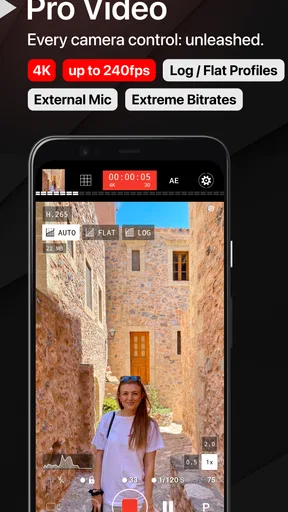
If I decide to record moving scenes, the video controls add another layer of choice: the app supports recording up to 4K and lets me adjust frame rates and bit rates. I would make those decisions before filming rather than changing several settings in the middle of a moment. Higher-quality capture can be useful when I expect to keep or edit a clip, while a quick casual recording does not always need the most demanding option. The right choice depends on what I plan to do with the footage afterward.
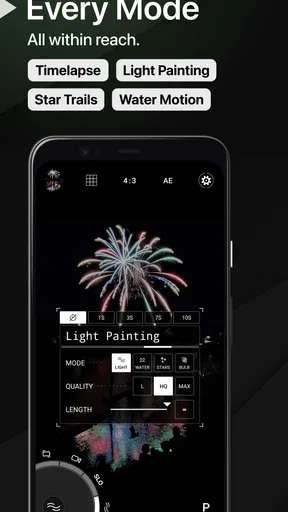
Time-lapse and slow-motion options suit scenes where the passage or change of time is part of the idea. I would use time-lapse for a steady view of activity unfolding and slow motion for a brief action worth examining at a different pace. Neither is a shortcut to a compelling video: framing and a suitable subject still matter. They are most helpful when I start with a clear reason for choosing that treatment.
Where the extra control earns its keep
Compared with the camera app that comes with a phone, a dedicated tool like this is appealing when I want direct access to exposure choices, RAW capture, or more deliberate video settings in one camera-focused place. The default app is often the easier pick when I want to open the camera and take a picture immediately, especially if I rarely edit or adjust anything. I would not switch merely for a longer settings menu; the controls are valuable only when I expect to use them.
Compared with using a separate editor after taking a photo, ProShot lets me influence the capture itself. That can be a real advantage when an exposure choice is difficult to fix later. But an editor is still the better choice for work that depends on extensive adjustments after the shot. I think of the two as different parts of the process, not interchangeable alternatives.
The main friction is that manual options take attention. Someone who prefers the phone to make every decision may find that extra control slows down routine photography. Video settings can also ask for more planning than a quick point-and-record approach. I would start with automatic shooting, learn one control when a particular scene calls for it, and avoid changing settings just because they are available.
Who I would recommend it to
I would recommend this app to phone photographers who enjoy learning how exposure affects a picture, want to experiment with RAW files, or switch between stills and more considered video. It can also suit someone who is building a personal shooting routine and wants their capture decisions in one place. The strongest reason to choose it is not that every photo will look better automatically; it is that I can take a more active role when a scene calls for it.
I would skip it if I mainly take casual snapshots, never plan to edit, and value the simplest possible camera above all else. I would also choose a dedicated photo or video editor when the essential work happens after capture. The app is more useful as a camera for making intentional source material than as a complete publishing studio.
Before buying, I would consider whether I will actually use its manual and video controls. ProShot costs $7.99, is rated Everyone, and has an average rating of 4.1 from around 19,000 ratings, with about 985 written reviews and over 500,000 installs. It was released on July 4, 2015, and version 8.33.1 requires Android 10 or later. Those details make it a specific Android choice, so an iPhone user should look for an option made for iOS rather than assume this version is available there.
Building a more deliberate camera routine
When I first opened ProShot, I felt like a kid at a candy store. The app is packed with features that mimic a DSLR, and I couldn't wait to dive in. Right off the bat, the interface is sleek and intuitive, making it easy for both beginners and seasoned photographers to navigate.
One of the standout features is the manual control. You can tweak everything from ISO to shutter speed, giving you full command over your shots. For those moments when you want to be a bit more hands-off, the app offers excellent automatic settings that still give you a professional touch. It's like having a mini studio in your pocket!
Filters and effects: choosing a look in camera
I’m a sucker for filters, and ProShot doesn't disappoint. The app offers a variety of filters and effects that can transform your ordinary photos into extraordinary works of art. Whether you're going for a vintage vibe or a modern look, there's something here to suit your style.
What's cool is that you can apply these filters in real-time. So, no more guessing games—what you see is what you get. This feature is a game-changer for anyone who wants to streamline their editing process.
Video capabilities that impress
Now, let’s talk about video. ProShot goes beyond still photography with its impressive video capabilities. You can shoot in up to 4K, which is pretty awesome if you're looking to dabble in videography. The app also allows you to adjust frame rates and bit rates, giving you the flexibility to experiment and find what works for you.
And here's a feature I absolutely love: time-lapse and slow-motion video options. These tools are perfect for capturing those mesmerizing moments that unfold over time, making your videos as dynamic as your photos.
User-friendly, with room to learn
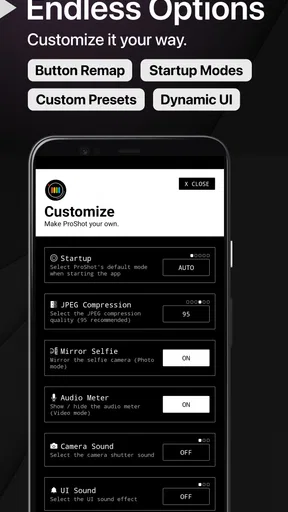
While there are plenty of features to explore, the app doesn’t overwhelm you. I appreciate how user-friendly it is. Everything is laid out logically, and you can easily find what you're looking for. The settings menu is comprehensive, yet straightforward, allowing you to customize your experience without a hitch.
The app also supports RAW format, which is a huge plus for anyone serious about post-processing. Having the ability to shoot in RAW means you can capture more data, giving you greater flexibility in editing later on. It's like having a safety net for your photographic experiments.
My creator verdict
After spending some quality time with it, I can confidently say ProShot is a strong fit for anyone passionate about photography and willing to use more than automatic mode. Whether you're just starting your photography journey or you're a seasoned pro, this app offers something for people who want to explore their camera controls.
Its combination of powerful features, user-friendly design, and high-quality output makes it stand out in a crowded market. I would give it a try if you want to take a more deliberate approach to smartphone photography; if you only need the quickest possible snapshot, your phone’s standard camera may be the better fit. For me, the best reason to use it is having the choice to keep things simple or take control when a shot deserves more attention.
Verdict
Strengths of ProShot
- Highly customizable camera settings.
- Intuitive user interface.
- Supports RAW image format.
- Advanced video recording options.
- Excellent manual controls.
Limitations of ProShot
- Steeper learning curve for beginners.
- Consumes significant battery power.
- Occasional app crashes reported.
- Limited free features available.
- No built-in photo editing tools.
Similar Picks in This Category
View All
Google Photos
Google LLC4.4

Gallery
Google LLC4.2

Picsart AI Photo Editor, Video
PicsArt, Inc.3.9

B612 AI Photo&Video Editor
SNOW Corporation4.1

BeautyPlus-Selfie Photo Editor
PIXOCIAL TECHNOLOGY (SINGAPORE) PTE. LTD.4.5

Remini - AI Photo Enhancer
Bending Spoons4.1
Frequently Asked Questions
What is ProShot and what features does it offer?
ProShot is a professional photography app designed for both Android and iOS devices. It offers a variety of features such as manual controls for exposure, ISO, shutter speed, and white balance. Additionally, it supports RAW and JPEG formats, has a live histogram, and offers time-lapse and video recording capabilities. This makes it ideal for both amateur and professional photographers.
Is ProShot suitable for beginners in photography?
Yes, ProShot is suitable for beginners as it offers an intuitive interface with easy-to-understand controls. While it provides advanced features for professional use, beginners can start with automatic settings and gradually explore manual modes as they become more comfortable. The app also offers tutorials and tips to help users learn and improve their photography skills.
Does ProShot support video recording, and what are the options?
ProShot supports video recording with a range of options to enhance quality and creativity. Users can adjust frame rates, resolution, and bit rate settings. It also includes features like slow-motion and time-lapse video capture. The app is designed to give users control over video elements just like in photography, making it a versatile tool for content creators.
How does ProShot handle low-light photography?
ProShot excels in low-light photography by allowing users to manually adjust ISO and shutter speed, which can help capture better images in dim conditions. It also offers a night mode that optimizes settings for low-light environments, reducing noise and enhancing detail. This makes it a reliable app for nighttime or indoor photography.
Is ProShot compatible with all Android and iOS devices?
ProShot is compatible with a wide range of Android and iOS devices, but it's important to check the specific requirements on the app's download page. Some advanced features may require more recent hardware or software updates. Users should ensure their device meets the necessary specifications for optimal performance and access to all features.
